
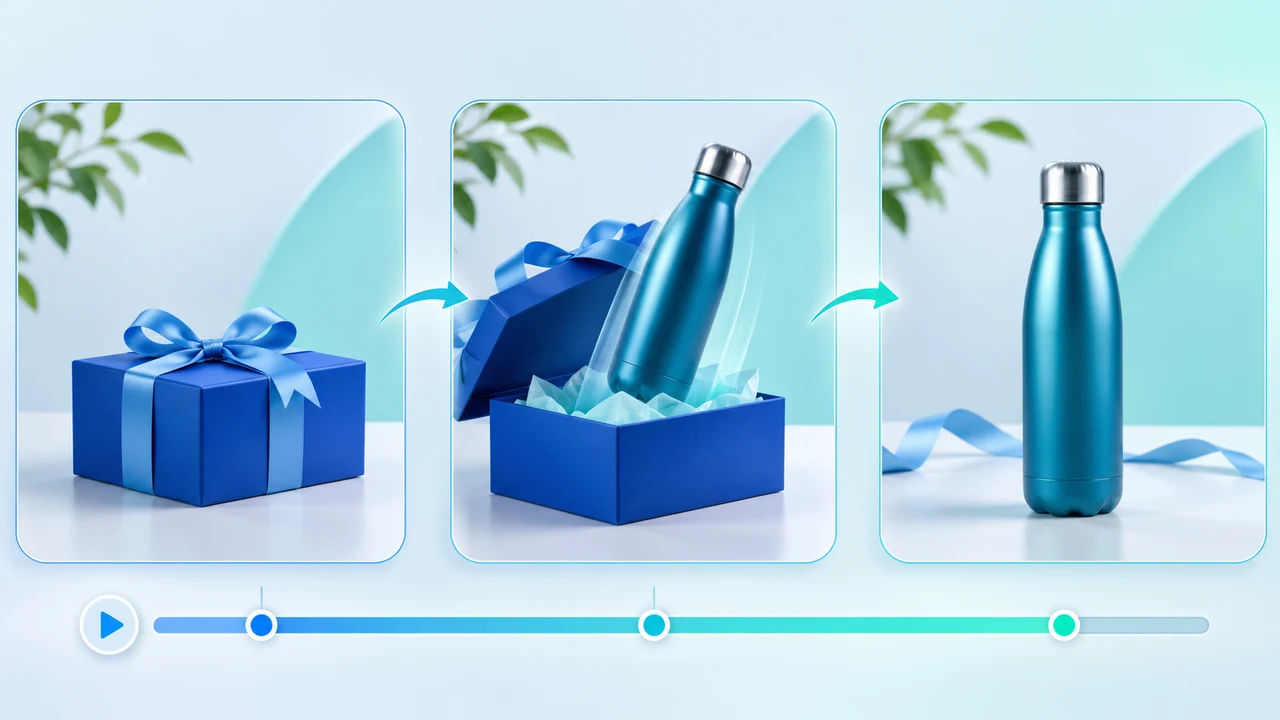
Pika 2.5 Frames tutorial: turn three approved product stills into a controlled vertical reveal.
What this Pika 2.5 Frames tutorial delivers
Pika 2.5 Frames tutorial readers will turn three permission-cleared vertical stills into one short product reveal: a cobalt-blue package closed on a tabletop, the approved bottle upright in use, and a clean front-facing pack shot with room for a later call to action. The three images create two generated transitions. The measurable output is a silent 9:16 sequence whose product proportions, cap, label position, palette, horizon, and light direction pass frame-by-frame review. This is a bounded interpolation task, not a claim that AI can invent an accurate product ad from one loose reference.
Pika's current official Pikaframes page says the tool accepts two to five ordered images. Every consecutive pair becomes a transition, one optional prompt guides the sequence, and each transition can run one to five seconds; a ten-second option is documented only when exactly two keyframes are used. The Pika 2.5 capability page adds that up to four keyframes can render at 720p or 1080p, while five keyframes render at 720p. Both pages are undated and were checked November 18, 2026. Pika also states that renders return silent.
The operational research source is Tao Prompts' March 6, 2025 Pika 2.2 walkthrough, which demonstrates first/last-frame transformations, loops, and camera direction. It uses an older two-frame interface and its paid-plan comments are obsolete, so this article borrows only the planning lesson: match the source frames and keep motion direct. Current controls, limits, resolution, and rights come from Pika's live official pages. No generation was submitted for this article, and vendor or creator examples are not presented as StevenVideo test results. For a managed hybrid workflow, see AI video production in Vancouver.
Prepare three 9:16 stills as continuity anchors
Build the three stills before opening Pika. Use product photography or artwork you own, and confirm permission for cloud upload, AI transformation, commercial publication, and any depicted person. Keep the untouched masters, usage record, approved product artwork, colour references, and a simple continuity sheet. If the bottle label contains regulated copy, pricing, ingredients, or a trademark, preserve a clean product plate for compositing rather than asking the model to redraw those details.
Create all three canvases at the same 9:16 dimensions. Frame 1 — closed package: cobalt-blue box centred on a pale tabletop, bottle hidden, camera slightly above product level. Frame 2 — product in use: the same bottle upright beside the open box, unchanged camera height, product scale, horizon, key light from camera left, and soft shadow direction. Frame 3 — pack shot: bottle front-facing, box secondary, generous clean space above or beside it for editor-added graphics. Keep the bottle at nearly the same scale across frames. Large jumps in angle, lens perspective, background geometry, or light ask the model to solve too many problems at once.
Place the real label consistently in each source still, but expect generated in-between frames to distort small lettering. Decide in advance that the model may generate motion and lighting continuity, while accurate label art, logo, price, legal line, and CTA will be replaced in the editor. Name the files in order, such as `01_closed`, `02_open_product`, and `03_packshot`, and export high-quality stills without hidden layers or accidental metadata. Review the sequence as a three-frame storyboard: if the action is unclear when clicked through manually, generated motion will not repair the story.
Open Frames, order the images, and use one controlled prompt
Sign in to Pika Create, open Pikaframes or choose Pika 2.5 and switch to Frames, then attach the three stills in story order. The current official page says two to five images are supported and that consecutive pairs become transitions. With three images, plan two transitions rather than one ten-second shot. Choose the same duration for each pair if the live control applies one setting across the sequence; for this reveal, start at three seconds per transition so the full motion stays concise. Select 9:16 through the source images, then choose 720p for a proof. The official prompt guide says an attached image supplies its own shape.
Use one motion idea across both transitions. Copy this original prompt: The camera makes one slow clockwise tabletop orbit as the closed cobalt-blue gift box opens cleanly, the approved bottle rises upright without changing shape, and the final frame settles into the exact front-facing pack shot; preserve bottle proportions, cap, label placement, blue palette, horizon, light direction and background geometry; no new text, no extra products, no hands. Pika's official prompt guide recommends one camera move and small physical actions when working from images. The guide is undated and was checked November 18, 2026.
Before pressing Generate, confirm image order, aspect, duration per transition, resolution, and the credit total shown in the signed-in interface. The current public pricing table lists Pika 2.5 at 20 credits for a 720p five-second generation, but it does not specify this three-frame sequence's exact charge. Do not multiply or guess; record the live estimate. Submit one proof only. A professional product workflow should approve structure before spending credits on resolution or retries.
Review both transitions and retry only the failed variable
Watch the complete proof once at normal speed, then inspect both transitions frame by frame. At the first transition, check whether the box opens rather than melts, whether the bottle emerges as one object, and whether the camera follows the intended slow orbit. At the second, check cap shape, bottle width and height, label location, horizon, shadows, and the exact settling frame. Reject duplicated caps, extra bottles, liquid surfaces, warped logos, crawling text, scale jumps, background tearing, sudden camera acceleration, or a final frame that does not match the approved pack shot.
Name one failure class before changing anything. Label drift: remove the demand for readable text, keep a blank tracked label area, and restore the approved label in post. Product geometry changes: reduce orbit distance, make the source scales closer, and simplify the action. Background tears: match tabletop edges and horizon across all three stills. Motion stalls at frame 2: make the middle frame a clear action beat rather than a second final pose. Camera jerks: replace the orbit with a locked shot or slow push-in. The two transitions feel unrelated: shorten the prompt and repeat one movement and one light direction.
Use one controlled retry per failure class. Do not replace all stills, rewrite the prompt, change duration, and raise resolution simultaneously. Keep a generation log with image versions, order, prompt, duration, resolution, displayed credits, output ID, rejection reason, and next change. Set a stop rule: one proof, one geometry or motion adjustment, and one simplified fallback. If the product still mutates, cut between approved stills, animate them conventionally, or film a real tabletop reveal. Subscription access is not a reason to burn credits past the point where accurate product evidence has failed.
Check current access, credits, and commercial-use rights
Pika's pricing page, last updated October 28, 2026 and rechecked November 18, lists Free, Starter, Creator, and Fancy as the current individual plans. All include access to all models and no-watermark exports. However, the Free plan provides no monthly credits and relies on purchased credit packs, and it explicitly does not include a commercial license. Starter is currently US$10 monthly with 600 monthly credits, Creator US$35 with 2,600, and Fancy from US$95 with 8,550; annual billing is listed at 20% less. Prices, credits, queues, and promotions can change, so verify the signed-in subscription before production.
For a client or paid campaign, use a plan whose current terms include commercial use and retain the plan receipt or entitlement note with the project. Starter, Creator, and Fancy are currently marked as including a commercial license. That platform permission does not replace rights to the product design, photography, music, model likeness, location, typography, or third-party assets. Free output being watermark-free is not the same as being cleared for commercial use. If a legacy account still shows Basic, Standard, Pro, or Unlimited, Pika's current FAQ calls those legacy names and directs users to the Subscription page for their actual terms.
Budget retries, editorial finishing, and approval—not only the first render. The public table's 20-credit example applies to Pika 2.5 at 720p for five seconds, while actual Frames cost depends on the live sequence settings. Record the pre-generation number rather than publishing an inferred price per finished ad. For a campaign that also needs real product capture, multiple aspect ratios, licensed sound, and client revisions, compare the full scope with promotional video pricing.
Export the silent render, finish in an editor, and run QA
Download the selected proof and, only if needed, rerun the approved setup at 1080p. Pika currently documents 720p and 1080p for sequences with up to four keyframes, so three keyframes qualify technically; still confirm the live option and actual downloaded dimensions. Inspect codec, frame rate, duration, orientation, and whether the output begins and ends on the intended stills. Keep the source images, low-resolution proof, selected high-resolution render, and any clean product plate as separate assets. Pika 2.5 renders are silent, so sound is a post-production responsibility.
In the editor, stabilize or trim weak edge frames, composite the approved label and logo, add licensed music and restrained box-open or product-settle effects, and create accurate captions or CTA graphics. Keep typography inside mobile safe areas. Export a clean no-text master, a client review file, and the final 9:16 delivery. Do not claim Pika generated the music, accurate label, or finished campaign graphics. If a transition remains unreliable but its ending frames are strong, use a short cut, mask, or conventional motion treatment instead of hiding deformation under loud sound.
Run three QA passes. Product: shape, cap, label position, colour, scale, reflections, and box geometry. Motion: one coherent camera move, clean transition at the middle keyframe, no freeze, jump, tear, duplicate, or unwanted object. Delivery: dimensions, duration, first and last frames, audio rights, loudness, spelling, logo, safe area, mobile playback, filename, commercial entitlement, and stakeholder approval. Archive prompts, settings, credits, outputs, rejected reasons, licences, editor project, and final approval. The paired Chinese Pika 2.5 Frames tutorial follows the same verified workflow. For a product launch that needs live-action accuracy plus controlled AI transitions, contact Steven Video Production with the approved stills, usage rights, platform, deadline, and non-negotiable product details.
Frequently Asked Questions
How many images can Pika 2.5 Frames use?
Pika currently documents two to five ordered images. Every consecutive pair becomes a transition, and one optional prompt guides the whole sequence.
How long can each Pikaframes transition be?
Each transition can be one to five seconds. Pika documents a ten-second option only when the sequence uses exactly two keyframes.
Can Pika 2.5 Frames export at 1080p?
Yes, Pika currently lists 720p or 1080p with up to four keyframes. A five-keyframe sequence is limited to 720p. Confirm the live export option before delivery.
Does Pika 2.5 Frames generate sound?
No. Pika says Pika 2.5 renders are silent. Add licensed music, ambience, foley, dialogue, and final loudness control in post-production.
Can I use Pika Free videos commercially?
Not under the current pricing table. Free exports have no watermark, but the Free plan does not include a commercial license. Starter, Creator, and Fancy currently do.
How much does a three-keyframe Pika sequence cost?
The public pricing table lists 20 credits for a five-second 720p Pika 2.5 generation, but it does not state the exact cost of this three-frame sequence. Use the signed-in pre-generation total.
Ready to start your project?
Get in touch for a free consultation. I typically respond within a few hours.